
I accidentally broke my website. Claude fixed it in minutes


For a few weeks there, my website was missing articles. It's not a huge deal, but it broke in a very silent, sneaky way. Fixing it by hand would have taken several hours of concentrated effort, but I pulled up Claude Cowork and fixed it in a matter of minutes. I'm still shocked at how painless it was.
I was writing about Spotify's Page Match feature when I tried to link to an older article about Spotify I had written. But I couldn't find it anywhere; not on my website or anywhere. I knew I had written it, but I couldn't find it locally, I hadn't sent a newsletter about it, and I never posted it on BlueSky. There was no proof it ever existed! Was I going crazy??
The issue
The root cause is that I got a second Mac and used the Migration Assistant to set it up. That worked splendidly, but the way I build my website is by processing a bunch of local files and then uploading them to GitHub. I was using a separate instance of Publii on both laptops to write articles, which meant I had two different versions of my site depending on which laptop I was using!
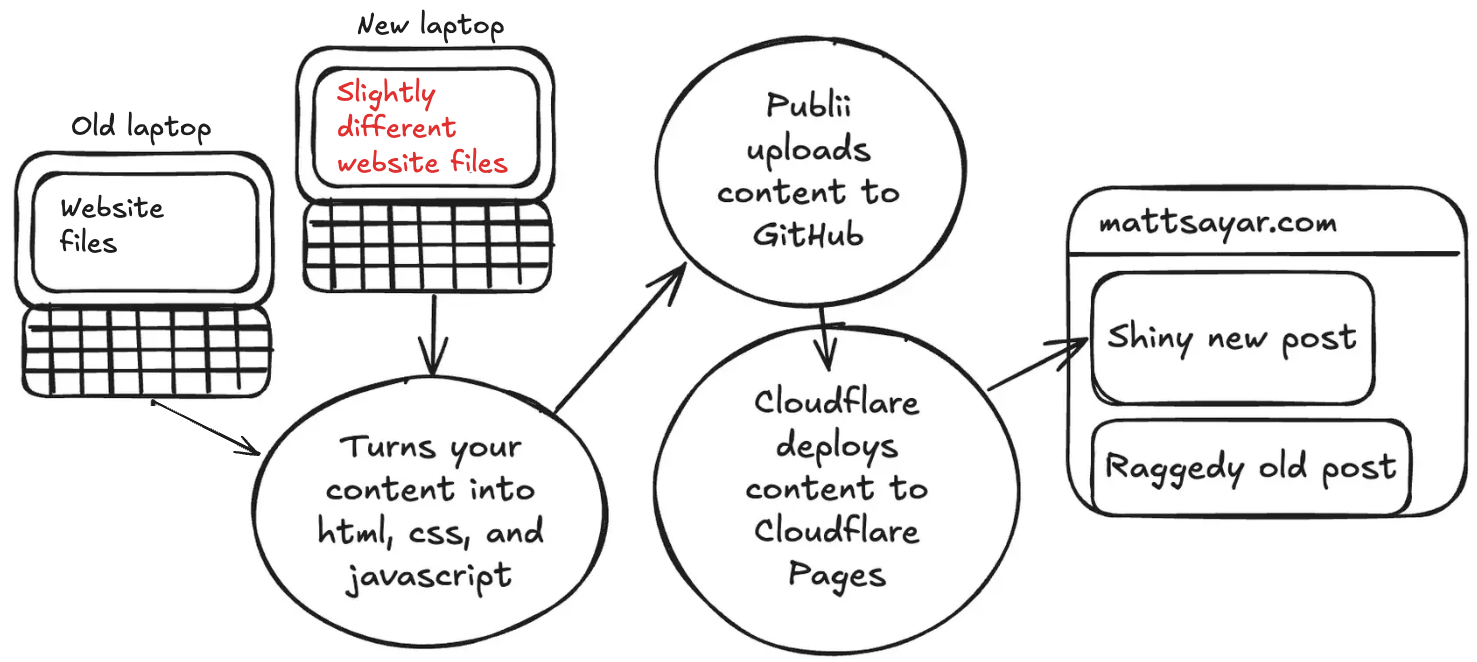
Logically, I just need to use the same centralized source to store my site's files, and I decided on Google Drive since Google is the ecosystem I'm most plugged in to. But the Migration Assistant was too helpful: Google Drive and Chrome believed both my laptops were the same laptop. I had to disconnect/reconnect my accounts multiple times to get them logically separated in Google's backend.
Now, how to resolve the differences between the sites? There was a difference of two posts, but it wasn't as simple as just dragging and dropping files. Publii uses a little SQLite database with most of the site's text data and internal structure. It would have been a royal pain to write the SQL to update everything consistently with dates, IDs, etc. Instead, I made Claude do it.
I opened Claude Cowork in my site's root directory with my canonical (old laptop's) files. I uploaded a .tar with the new laptop's site files and told it:
Both posts have been successfully copied into your canonical Publii site. Here's a summary of what was done:ID mapping — The tar file had these posts at IDs 64 and 65, but your canonical DB already uses those IDs for different posts. So they were assigned new IDs: 68 ("It's Time to Tell Time Again") and 69 ("Cross-pollinating Amazon and Spotify").What was copied for each post:Post record with all original timestamps preserved (created_atandmodified_at)Featured images —SCR-20251210-qaed.pngfor Tell Time Again,audio-8324329_1280.pngfor Cross-pollinatingAll media files including responsive/webp variants (7 files for post 68, 19 files for post 69), all with original file timestamps preserved viacp -rpTag associations — Tell Time Again: llm, toy-code, claude, github; Cross-pollinating: llm, claude, techAdditional metadata —_coreandpostViewSettingsfor both postsPost status — both set topublishedas in the source
Straightforward, but effective!
You should also read:
Claude just bought me a car
Unfortunately, my car was recently totaled after a rear-end collision. Thankfully, everybody is okay. Armed with a $21,000 check from the insurance company, I needed a new car ASAP. Somewhat relatedly, a couple of months ago I won a prize from a local radio station.
Continue reading...Downgrading Claude Code to run on my Raspberry Pi
This is a secret post that you won't see if you only subscribe to my newsletter. I'm doing this on purpose because I want to write on my site more, but I don't necessarily want to blast the whole email list every time! But how…
Continue reading...How I vibe coded a math game in ten minutes
I received a ticket from my product manager (my wife) to add a new feature for our largest customer (my kindergartner). The requirements doc included a worksheet from school that looked like this. I took that exact screenshot (blurriness, bad lighting, scribbles, and all) and…
Continue reading...